Pages

Monday, February 18, 2019

Fast + Furtherest

Continuous Cricket Rules
Written by: Kahciar

Object

The object of the game is to score more runs than the other team.

Players

CLASS: Divide into two even teams/ half the class into even teams.
-
Basically, dividing the teams into even numbers.

Equipment

  • 2 Bats
  • 2 Balls (If you lose one.)
  • 1 OR 2 Wickets.
  • Bowler base.

Scoring

To get the most amount of wins than the other team.

Winning

The teams that has the most runs/points.

Rules

  • The fielders must switch turns at being the bowler.
  • You can get out by either the fielders catch the ball on the full or with one hand.
  • When you hit the ball, you have to run to right then left.
  • Bowler has to throw the ball under-arm.
  • Once all of the batters have batted, the teams switch over.
  • The bowler does not have to wait for the batter to get back.
  • If you hit the wickets the batter is automatically out and the teams switch.
  • The bowler must bounce the ball when they bowl it

Monday, February 11, 2019

Commitment

Commitment
By Emily, Mikayla, Heaven & Kahciar


Today we started talking about HHS 'CARR' Values. Mr. Tisch gave us a value out of 'Commitment, Achievement, Resilience and Respect. He gave us Commitment. We discussed about what we should present our work on. We choose to make a slide and a video. We filmed a video on what Commitment: Sounds like, feels like and looks like. After we finished the video, we exported the video onto the presentation and published it onto our blogs.


Thursday, December 6, 2018

Passion Project Reflection

Passion Project Reflection


Augmented Reality Sandbox
[ Digital World ]


First Week, of passion projects. We discussed about the topic 'Augmented Reality Sandbox'. We researched about how the sandbox works and what materials we needed to create the sandbox. We wrote down a draft of the materials that we needed and how it will work.

Second Week, we sketched a rough copy of the reality sandbox. We wrote the official measurements onto the drawing and also the materials. 

Third Week, the admins contacted different stores for the equipment we needed. Before they sent anything, they showed a adult for permission. 

Fourth Week, the construction team and also admins got taught on how to draw the sandbox properly, and also how to put the materials on the drawing. The technology team got taught on how to work the system for the sandbox.

Fifth Week, the construction team went into the workshop and worked out the measurements with the teacher. Then they looked at the different types of wood, that the school had already had in store. The teacher took the measurements and cut the wood for us. Then the construction team started building the sandbox. 

Sixth Week, one sandbox got finished. So the sand team, went out to the beach and collected the sand. While they went out to do that, the other teams worked on the sandbox and others worked on the presentations. When the sand team came back they cleaned out the sand and made sure there were no little particles that could harm our hands.

Seventh Week, some of the presentations got finished. The construction team continued to stride and finish another sandbox. 

Eight Week, we started our blog posts on the reflection of the process of this passion project. This week was more of a chill week. The construction team still working hard to finish.

Ninth Week, (Today) the teams are starting to finish their presentations and send it to Mr. Stokes to put them together.

What did I enjoy about this passion project?
I enjoyed that we could use our creativity to create these sandboxes.

What did I Dislike About This Passion Project?
Believe it or not, I did not dislike anything about this project. It was super fun and I learnt about different things everyday.
What Am I Looking Forward Too See?
I am looking forward to seeing the Musical Theatre and Discovery.

Monday, December 3, 2018

Reflection About Cybersmart

Term 1
Lesson One: We made a digital poster about 'How To Use Your Smarts To Protect Your Chromebook.'
Lesson Two: We talked about how to keep our passwords a secret and common passwords that you shouldn't use. 
Lesson Three: We learn which keyboard shortcuts are the most effective. 
Lesson Four: We learnt about what to share online. Public Vs Private Information.
Lesson Five:
We wanted to grow our audience. So we talked about how we can plus the amount of viewers. 

Lesson Six: We found out how we can find out information about someone else.

What Did I Like About Cybersmarts? 
I liked that we learnt about useful topics and tips and tricks on different shortcuts.

Something I didn't enjoy?
Having to blog all the time.


Something my Cybersmarts teacher did well...?
She was very clear about what she was teaching us.

Something she could do better?
Be more excited about the topic that she is teaching.

Monday, November 26, 2018

🥀 - Hello, Emma! 👋

🥀 - Hello, Emma! 👋

🙋 My name is Kahciar, I attend Hornby High School. I am a year 7 soon to be a year 8. 

🚶 My hobbies are writing, reading, listening to K-pop ( Korean Pop ) and KRNB ( Korean RNB ), painting and Korean and Chinese dramas. I also like being independent and being in my own space.

If I won the Summer Learning Journery, what would I want to win?

🎉 If I won the SLJ, I would like to win another Chromebook.


Monday, November 12, 2018

A Google A Day - Question

A Google A Day

Question: 
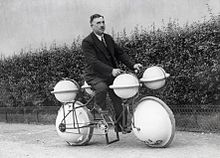
This invention was initially created as a walking machine and then was tweaked in 1932 to become amphibious. But neither of these are its main purpose now. What is the invention? 

Answer:
Amphibious Cycle ( Cyclomer )


What Did I Learn?
I learnt that if you search the main words (example. Steven Adams rookie ) you will get more information about the topic.